Differentiable beamforming for ultrasound autofocusing
In this tutorial we will implement a basic differential beamformer. We will use a gradient descent method to minimize a pixelwise common midpoint phase error to estimate a speed of sound map. The algorithm is slightly simplified, loss is computed without patching.
For more information we would like to refer you to the original research project page of the differential beamformer for ultrasound autofocusing (DBUA) paper:
Simson, W., Zhuang, L., Sanabria, S.J., Antil, N., Dahl, J.J., Hyun, D. (2023). Differentiable Beamforming for Ultrasound Autofocusing. Medical Image Computing and Computer Assisted Intervention (MICCAI)



‼️ Important: This notebook is optimized for GPU/TPU. Code execution on a CPU may be very slow.
If you are running in Colab, please enable a hardware accelerator via:
Runtime → Change runtime type → Hardware accelerator → GPU/TPU 🚀.
[1]:
%%capture
%pip install zea
[2]:
import os

os.environ["KERAS_BACKEND"] = "jax"
os.environ["ZEA_DISABLE_CACHE"] = "1"
os.environ["ZEA_LOG_LEVEL"] = "INFO"
[3]:
import time
import numpy as np
import matplotlib.pyplot as plt
import keras
from keras import ops
from keras.utils import Progbar

import zea
from zea import File, init_device
from zea.visualize import set_mpl_style
from zea.io_lib import matplotlib_figure_to_numpy, save_to_gif
from zea.backend.optimizer import adam
from zea.backend.autograd import AutoGrad
from zea.ops import (
    TOFCorrection,
    CommonMidpointPhaseError,
    PatchedGrid,
    EnvelopeDetect,
    Normalize,
    DelayAndSum,
    LogCompress,
    ReshapeGrid,
)
zea: Using backend 'jax'
We will work with the GPU if available, and initialize using init_device to pick the best available device. Also, (optionally), we will set the matplotlib style for plotting.
[4]:
init_device(verbose=False)
set_mpl_style()
Load dataset
First let’s load a dataset. In this case a circular inclusion in an isoechoic medium, simulated in k-Wave and stored to zea data format. It will automatically load the dataset from our Hugging Face repository.
[5]:
file_path = "hf://zeahub/simulations/circular_inclusion_simulation.hdf5"
file = File(file_path)
data_frame = file.load_data(data_type="raw_data")
probe = file.probe()
Setting up the pipelines
We will set up two separate pipelines for processing the data in this notebook. This is a good example of how to use multiple different ultrasound pipelines for different purposes.
loss_pipeline: does time-of-flight correction and computes the pixelwise loss based on the common midpoint error.image_plot_pipeline: does time-of-flight correction and delay-and-sum beamforming to produce a B-mode image for visualization.
Lets start with defining a field of view and f-number.
[6]:
xlims = (-15e-3, 15e-3)
zlims = (0e-3, 30e-3)
f_number = 0.7

x_min, x_max = xlims
z_min, z_max = zlims
Loss pipeline
We begin with selecting a grid of points where we will be calculating the loss. This grid is more an indication of how many points we consider per step as we resample them every iteration within the bounds of the field of view. The main star of the loss is the zea.ops.CommonMidpointPhaseError, which essentially computes the phase error between signals from two different subapertures that originate from the same point in the field of view. See this paper for more info. We will use this as a pixelwise loss function to optimize the sound speed map.
[7]:
grid_size_x = grid_size_z = 25

scan = file.scan(
    xlims=xlims,
    zlims=zlims,
    grid_size_x=grid_size_x,
    grid_size_z=grid_size_z,
    f_number=f_number,
)

loss_pipeline = zea.Pipeline(
    [
        PatchedGrid(
            [
                TOFCorrection(),
                CommonMidpointPhaseError(),
            ],
            num_patches=grid_size_z * grid_size_x,
        ),
        ReshapeGrid(),
    ],
    jit_options="pipeline",
)
parameters = loss_pipeline.prepare_parameters(probe, scan)
zea: WARNING No initial times provided, using zeros
zea: WARNING No azimuth angles provided, using zeros
zea: WARNING No transmit origins provided, using zeros
Image pipeline
We can now construct a pipeline for the B-mode image for visualization of the B-mode while optimizing the speed of sound map. Note that we now use a denser grid for the beamforming grid to produce an image without aliasing.
[8]:
width, height = xlims[1] - xlims[0], zlims[1] - zlims[0]
wavelength = 1540 / probe.center_frequency

grid_size_x = int(width / (0.5 * wavelength) / 4) + 1
grid_size_z = int(height / (0.5 * wavelength) / 4) + 1
[9]:
scan_plot = file.scan(
    xlims=xlims,
    zlims=zlims,
    grid_size_x=grid_size_x,
    grid_size_z=grid_size_z,
    f_number=f_number,
)

image_plot_pipeline = zea.Pipeline(
    [
        PatchedGrid(
            [TOFCorrection(), DelayAndSum()],
            num_patches=grid_size_x * grid_size_z,
        ),
        ReshapeGrid(),
        EnvelopeDetect(),
        Normalize(),
        LogCompress(),
    ],
    jit_options="pipeline",
)

parameters_plot = image_plot_pipeline.prepare_parameters(probe, scan_plot)
zea: WARNING No initial times provided, using zeros
zea: WARNING No azimuth angles provided, using zeros
zea: WARNING No transmit origins provided, using zeros
[10]:
print("Comparison of beamforming grid sizes:")
print(f"Loss pipeline grid size (sos): {scan['grid_size_x']} x {scan['grid_size_z']}")
print(f"Image pipeline grid size (B-mode): {scan_plot['grid_size_x']} x {scan_plot['grid_size_z']}")
Comparison of beamforming grid sizes:
Loss pipeline grid size (sos): 25 x 25
Image pipeline grid size (B-mode): 71 x 71
Set up speed of sound grid
Here we define the grid of sound speed voxels that will be optimized.
[11]:
sos_grid_x = ops.linspace(x_min, x_max, 40)
sos_grid_z = ops.linspace(z_min, z_max, 40)
initial_sound_speed = 1460
sos_map = initial_sound_speed * ops.ones((sos_grid_z.shape[0], sos_grid_x.shape[0]))
Optimizer
Here we define the optimization schedule parameters.
[12]:
num_iterations = 200
step_size = 1
[13]:
init_fn, update_fn, get_params_fn = adam(step_size)
opt_state = init_fn(sos_map)
Loss function and optimization loop
Here we combine the pixelwise loss with some regularizers along the lateral and axial dimensions to aid the optimization. Furthermore, we introduce some helper functions for the optimization loop.
[14]:
def loss_fn(
    sos_map,
    sos_grid_x,
    sos_grid_z,
    loss_pipeline,
    parameters,
    data_frame,
    flatgrid,
):
    dx_sos = sos_grid_x[1] - sos_grid_x[0]
    dz_sos = sos_grid_z[1] - sos_grid_z[0]
    parameters["flatgrid"] = flatgrid
    out = loss_pipeline(
        data=data_frame,
        sos_map=sos_map,
        sos_grid_x=sos_grid_x,
        sos_grid_z=sos_grid_z,
        **parameters,
    )
    metric = out["data"]
    metric_safe = ops.nan_to_num(metric, nan=0.0)
    metric_loss = ops.mean(metric_safe)
    tvz = ops.mean(ops.square(ops.diff(sos_map, axis=0)))
    tvx = ops.mean(ops.square(ops.diff(sos_map, axis=1)))
    variation_loss = (tvx + tvz) * 1e2 * dx_sos * dz_sos
    total_loss = metric_loss + variation_loss
    return total_loss


loss_fn_caller = AutoGrad()
loss_fn_caller.set_function(loss_fn)


def compute_gradients(sos_map, data_frame, flatgrid):
    kwargs = dict(
        sos_grid_x=sos_grid_x,
        sos_grid_z=sos_grid_z,
        loss_pipeline=loss_pipeline,
        parameters=parameters,
        data_frame=data_frame,
        flatgrid=flatgrid,
    )
    grad, loss = loss_fn_caller.gradient_and_value(sos_map, **kwargs)

    return grad, loss


def apply_gradients(opt_state, grad):
    new_sos_grid, m, v, i = update_fn(grad, opt_state)
    new_opt_state = (new_sos_grid, m, v, i)
    return new_sos_grid, new_opt_state


def resample_grid(parameters, xlims, zlims):
    seed_generator = keras.random.SeedGenerator(int(time.time() * 1e6) % (2**32 - 1))
    n_pix = parameters["flatgrid"].shape[0]
    x = keras.random.uniform(
        shape=(n_pix,), minval=xlims[0] + 5e-3, maxval=xlims[1], seed=seed_generator
    )
    y = ops.zeros_like(x)
    z = keras.random.uniform(shape=(n_pix,), minval=zlims[0], maxval=zlims[1], seed=seed_generator)

    coords = ops.stack([x, y, z], axis=-1)
    return coords
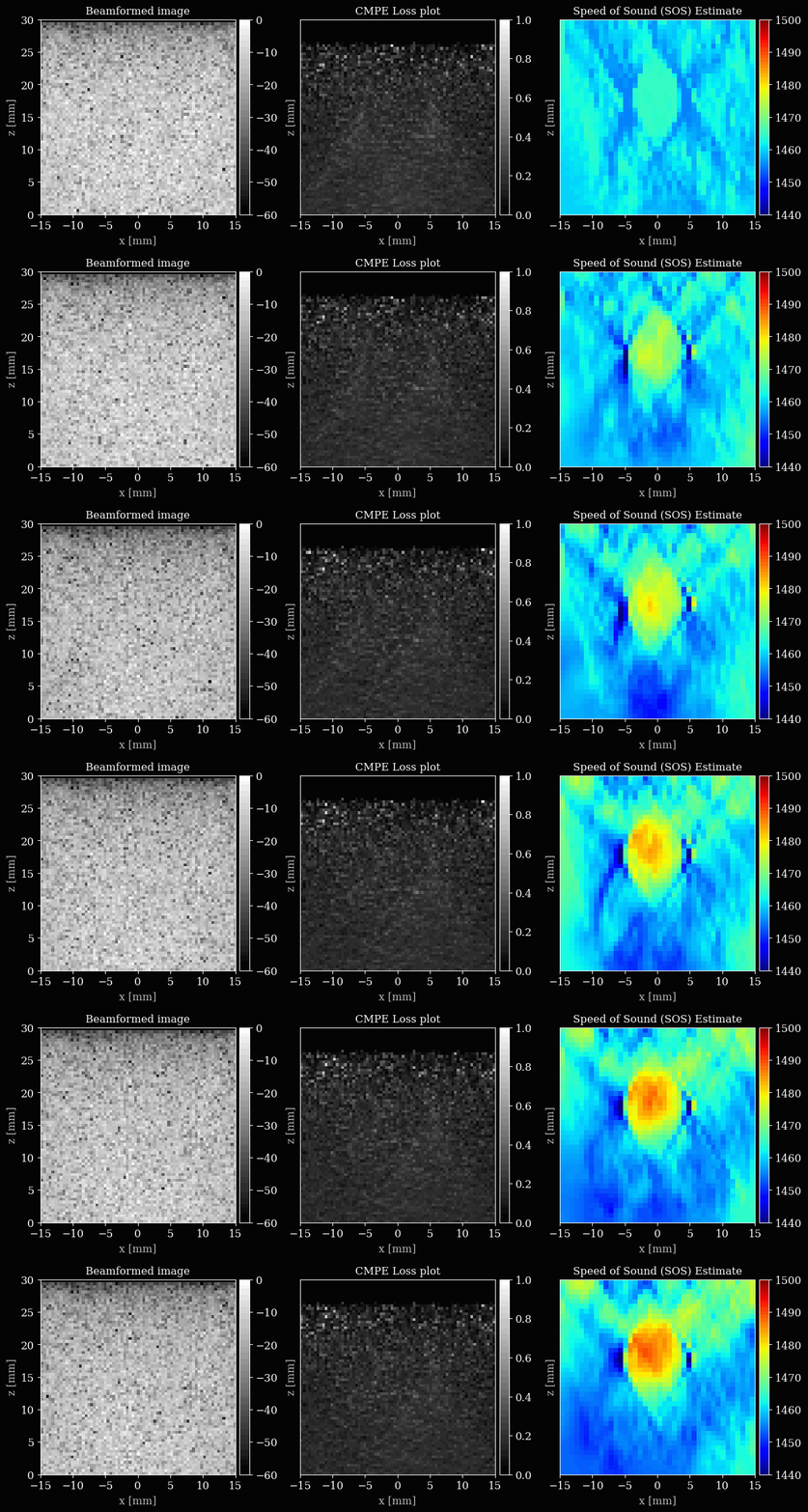
Let’s set up the plotting, with three subplots for the B-mode, loss map, and speed of sound map. We will update these after every few iterations to visualize the optimization process.
[15]:
%%capture
fig, (ax_bmode, ax_lossmap, ax_img) = plt.subplots(
    1,
    3,
    figsize=(15, 4),
    dpi=100,
)

extent = [
    ops.min(sos_grid_x) * 1000,
    ops.max(sos_grid_x) * 1000,
    ops.min(sos_grid_z) * 1000,
    ops.max(sos_grid_z) * 1000,
]
bmodeim = ax_bmode.imshow(
    np.zeros((grid_size_x, grid_size_z)),
    extent=extent,
    cmap="gray",
    vmin=-60,
    vmax=0,
)
lossim = ax_lossmap.imshow(
    np.zeros((grid_size_x, grid_size_z)),
    extent=extent,
    cmap="gray",
    vmin=0,
    vmax=1,
)
im = ax_img.imshow(
    np.zeros((grid_size_x, grid_size_z)),
    extent=extent,
    cmap="jet",
    origin="lower",
)
im.set_clim(1440, 1500)

ax_bmode.set_title("Beamformed image")
ax_bmode.set_xlabel("x [mm]")
ax_bmode.set_ylabel("z [mm]")

ax_lossmap.set_title("CMPE Loss plot")
ax_lossmap.set_xlabel("x [mm]")
ax_lossmap.set_ylabel("z [mm]")
ax_lossmap.set_yticks([])

ax_img.set_title("Speed of Sound (SOS) Estimate")
ax_img.set_xlabel("x [mm]")
ax_img.set_ylabel("z [mm]")
ax_img.invert_yaxis()
ax_img.set_yticks([])

fig.colorbar(bmodeim, ax=ax_bmode, fraction=0.05, pad=0.02)
fig.colorbar(lossim, ax=ax_lossmap, fraction=0.05, pad=0.02)
fig.colorbar(im, ax=ax_img, fraction=0.05, pad=0.02)
Now we can finally iteratively update the sound speed grid to minimize the common midpoint phase error.
[16]:
viz_frames = []
progbar = Progbar(num_iterations)
for i in range(num_iterations):
    flatgrid = resample_grid(parameters, xlims, zlims)
    grad, loss = compute_gradients(sos_map, data_frame, flatgrid)
    sos_map, opt_state = apply_gradients(opt_state, grad)
    progbar.update(i + 1, [("loss", loss)])
    if (i + 1) % 5 == 0 or i == num_iterations - 1:
        bmode = image_plot_pipeline(
            data=data_frame,
            sos_map=sos_map,
            sos_grid_x=sos_grid_x,
            sos_grid_z=sos_grid_z,
            **parameters_plot,
        )["data"][0].reshape(grid_size_x, grid_size_z)

        lossimage = loss_pipeline(
            data=data_frame,
            sos_map=sos_map,
            sos_grid_x=sos_grid_x,
            sos_grid_z=sos_grid_z,
            **parameters_plot,
        )["data"][0].reshape(grid_size_x, grid_size_z)

        bmodeim.set_data(bmode)
        lossim.set_data(lossimage)
        im.set_data(ops.convert_to_numpy(sos_map))
        viz_frames.append(matplotlib_figure_to_numpy(fig))

plt.close(fig)
save_to_gif(viz_frames, "sos_optim.gif", shared_color_palette=True, fps=10)
200/200 ━━━━━━━━━━━━━━━━━━━━ 47s 211ms/step - loss: 0.1738
zea: Successfully saved GIF to -> sos_optim.gif